Toronto Streetcar: Difference between revisions
Made the page a wiki article instead of an advertisement. |
Update, adding line 510 Spadina |
||
| Line 1: | Line 1: | ||
__NOTOC__{{Header|Toronto Streetcar 509 Harbourfront|#ff001a}} | __NOTOC__{{Header|Toronto Streetcar 509 Harbourfront & 510 Spadina|#ff001a}} | ||
509 Harbourfront | 509 Harbourfront and 510 Spadina are streetcar routes in Toronto, Canada, operated by the Toronto Transit Commission (TTC). <br/> | ||
Line 509 has 12 stops, two of which underground.<br/> | |||
Line 510 has 18 stops, three of which underground.<br/> | |||
| Line 13: | Line 14: | ||
<div id="mf-infoheader" style="padding:5px;background:#109EE5;color:white;font-size:120%;">General info</div><br/> | <div id="mf-infoheader" style="padding:5px;background:#109EE5;color:white;font-size:120%;">General info</div><br/> | ||
<div id="mf-infoheader" style="padding:5px;background:silver;color:white;font-size:110%;">Screenshot</div> | <div id="mf-infoheader" style="padding:5px;background:silver;color:white;font-size:110%;">Screenshot</div> | ||
[[File: | [[File:TorontoCover.png|330px]]<br/><br/> | ||
<div id="mf-infoheader" style="padding:2px;background:gray;color:white;font-size:85%;">'''Author:'''</div> | <div id="mf-infoheader" style="padding:2px;background:gray;color:white;font-size:85%;">'''Author:'''</div> | ||
<div id="mf-infoheader" style="padding:2px;background:white;color:black;font-size:85%;">Sjoerd Ydema</div> | <div id="mf-infoheader" style="padding:2px;background:white;color:black;font-size:85%;">Sjoerd Ydema</div> | ||
<div id="mf-infoheader" style="padding:2px;background:gray;color:white;font-size:85%;">'''Lines:'''</div> | <div id="mf-infoheader" style="padding:2px;background:gray;color:white;font-size:85%;">'''Lines:'''</div> | ||
<div id="mf-infoheader" style="padding:2px;background:white;color:black;font-size:85%;"> | <div id="mf-infoheader" style="padding:2px;background:white;color:black;font-size:85%;">2</div> | ||
<div id="mf-infoheader" style="padding:2px;background:gray;color:white;font-size:85%;">'''Traction power supply:'''</div> | <div id="mf-infoheader" style="padding:2px;background:gray;color:white;font-size:85%;">'''Traction power supply:'''</div> | ||
<div id="mf-infoheader" style="padding:2px;background:white;color:black;font-size:85%;">overhead wire</div> | <div id="mf-infoheader" style="padding:2px;background:white;color:black;font-size:85%;">overhead wire</div> | ||
<div id="mf-infoheader" style="padding:2px;background:gray;color:white;font-size:85%;">'''Description:'''</div> | <div id="mf-infoheader" style="padding:2px;background:gray;color:white;font-size:85%;">'''Description:'''</div> | ||
<div id="mf-infoheader" style="padding:2px;background:white;color:black;font-size:85%;">Recreation of line 509 of the Toronto Streetcar system</div> | <div id="mf-infoheader" style="padding:2px;background:white;color:black;font-size:85%;">Recreation of line 509 and 510 of the Toronto Streetcar system</div> | ||
<div id="mf-infoheader" style="padding:2px;background:gray;color:white;font-size:85%;">'''MetroSim Version Required:'''</div> | <div id="mf-infoheader" style="padding:2px;background:gray;color:white;font-size:85%;">'''MetroSim Version Required:'''</div> | ||
<div id="mf-infoheader" style="padding:2px;background:white;color:black;font-size:85%;">3.15</div> | <div id="mf-infoheader" style="padding:2px;background:white;color:black;font-size:85%;">3.15</div> | ||
<div id="mf-infoheader" style="padding:2px;background:gray;color:white;font-size:85%;">'''Download:'''</div> | <div id="mf-infoheader" style="padding:2px;background:gray;color:white;font-size:85%;">'''Download:'''</div> | ||
<div id="mf-infoheader" style="padding:2px;background:white;color:black;font-size:85%;">Not yet available - Route in production</div> | <div id="mf-infoheader" style="padding:2px;background:white;color:black;font-size:85%;">Not yet available - Route in production</div> | ||
</th> | </th> | ||
| Line 43: | Line 40: | ||
*509 Harbourfront | *509 Harbourfront | ||
*510 Spadina | |||
</div> | </div> | ||
| Line 110: | Line 108: | ||
Line 509 Harbourfront runs between Union Station and Exhibition, over a distance of approximately 4,1 kilometers. The line has 12 stops, of which two are underground (Unions Station and Queens Quay). | Line 509 Harbourfront runs between Union Station and Exhibition, over a distance of approximately 4,1 kilometers. The line has 12 stops, of which two are underground (Unions Station and Queens Quay). | ||
Unlike other streetcar routes ("streetcar" = tram) in Toronto, the 509 Harbourfront runs over its full length on separated tracks (right-of-way); aside from road crossings, the streetcars do not run between other traffic.<br/> | Unlike most other streetcar routes ("streetcar" = tram) in Toronto, the 509 Harbourfront runs over its full length on separated tracks (right-of-way); aside from road crossings, the streetcars do not run between other traffic.<br/> | ||
<br/> | <br/> | ||
Two sections of the line are shared with other lines; Between Union Station and Lower Spadina Avenue, the tracks are shared with the 510 Spadina streetcar (Union Station - Spadina Station). Between Bathurst Street and Exhibition, the tracks are shared with the 511 Bathurst streetcar (Bathurst Station - Exhibition).<br/> | Two sections of the line are shared with other lines; Between Union Station and Lower Spadina Avenue, the tracks are shared with the 510 Spadina streetcar (Union Station - Spadina Station). Between Bathurst Street and Exhibition, the tracks are shared with the 511 Bathurst streetcar (Bathurst Station - Exhibition).<br/> | ||
<br/> | <br/> | ||
Along the way, there are two intermediate turning loops; at Lower Spadina Avenue and at Fleet Street. These loops can be used to turn vehicles around in case of disruptions or delays, or to shorten a line during less busy times. | Along the way, there are two intermediate turning loops; at Lower Spadina Avenue and at Fleet Street. These loops can be used to turn vehicles around in case of disruptions or delays, or to shorten a line during less busy times. Both turning loops can be accessed from all sides.<br/> | ||
Both turning loops can be accessed from all sides.<br/> | |||
<br/> | <br/> | ||
Destination codes: <br/> | Destination codes: <br/> | ||
| Line 129: | Line 126: | ||
</tr> | </tr> | ||
</table> | </table> | ||
<br style="clear:both;"/> | |||
<table> | |||
<tr> | |||
<th colspan="4" width="100%" valign="top" style="border: 1px solid #B8B8B8; padding: 7px;"> | |||
<div id="mf-infoheader" style="width: 400px;padding:5px;background:#109EE5;color:white;font-size:120%;">Line 510</div> | |||
<div id="mf-info" style="padding-top: 10px; padding-left: 1em; color: grey; text-align: left;"> | |||
{{Navigatie Streetcar510}} | |||
<br/> | |||
{|{{Prettytable-SP}} | |||
{{SP-kop|510 Spadina|#004586|#ffffff}} | |||
{{SP-tabel}} | |||
{{SP-box | |||
| Route= Spadina - Union Station | |||
| Length= 18 Stops | |||
| tracks= 2 | |||
| Today= In use | |||
}} | |||
{{SP-kop|Trajectory|#004586|#FFFFFF}} | |||
{{SP-tabel}} | |||
{{SP|uKBHFa||'''[[Spadina Station]]'''<br><small>transfer: Subway 1</small>}} | |||
{{SP|utSTRe}} | |||
{{SP|uHST||[[Sussex St]]}} | |||
{{SP|uHST||[[Harbord St]]}} | |||
{{SP|uHST||[[Wilcocks St]]}} | |||
{{SP|uHST||[[College St]]<br><small>transfer: Streetcar 506</small>}} | |||
{{SP|uHST||[[Nassau St]]}} | |||
{{SP|uHST||[[Dundas St]]<br><small>transfer: Streetcar 505</small>}} | |||
{{SP|uHST||[[Sullivan St]]}} | |||
{{SP|uHST||[[Queen St]]<br><small>transfer: Streetcar 501</small>}} | |||
{{SP|uHST||[[Richtmond St]]<br><small>northbound only</small>}} | |||
{{SP|ueABZg+l||''<small>To King St Loop</small>''}} | |||
{{SP|uHST||[[King St]]<br><small>transfer: Streetcar 504/514</small>}} | |||
{{SP|uHST||[[Front St]]}} | |||
{{SP|uHST||[[Bremner Blvd]]}} | |||
{{SP|ueABZg+r||''<small>509 to Exhibition</small>}} | |||
{{SP|uHST||[[Lower Spadina Ave]]<br><small>transfer: Streetcar 509</small>}} | |||
{{SP|ueABZlf||''<small>to Spadina Loop''</small>}} | |||
{{SP|uHST||[[Rees St]]}} | |||
{{SP|uHST||[[Harbourfront Center]]}} | |||
{{SP|utSTRa}} | |||
{{SP|uHST||[[Queens Quay]]<br><small>Ferry docks</small>}} | |||
{{SP|uKBHFe||'''[[Union Station]]'''<br><small>transfer: Subway 1</small>}} | |||
|} | |||
|} | |||
Line 510 Spaina runs between Spadina Station and Union Station, over a distance of approximately 6 kilometers. The line has 18 stops, of which three are underground (Spadina Station, Queens Quay and Union Station). | |||
Unlike most other streetcar routes ("streetcar" = tram) in Toronto, the 510 Spadina runs over its full length on separated tracks (right-of-way); aside from road crossings, the streetcars do not run between other traffic.<br/> | |||
<br/> | |||
Between Lower Spadina Avenue and Union Station, the tracks are shared with the 509 Harbourfront (Exhibition - Union Station). <br/> | |||
<br/> | |||
Along the way, there are two intermediate turning loops; at Lower Spadina Avenue and at King Street. These loops can be used to turn vehicles around in case of disruptions or delays, or to shorten a line during less busy times. For example, the Spadina loop is used on sundays as an intermediate terminus for line 510, at which time only half of the 510 Spadina services continue to Union Station. | |||
Both turning loops can be accessed from all sides.<br/> | |||
<br/> | |||
Destination codes: <br/> | |||
S - Spadina Station <br/> | |||
K - King Street Loop <br/> | |||
Q - Queens Quay Spadina Loop <br/> | |||
U - Union Station <br/> | |||
</div> | |||
</th> | |||
</tr> | |||
</table> | |||
| Line 160: | Line 223: | ||
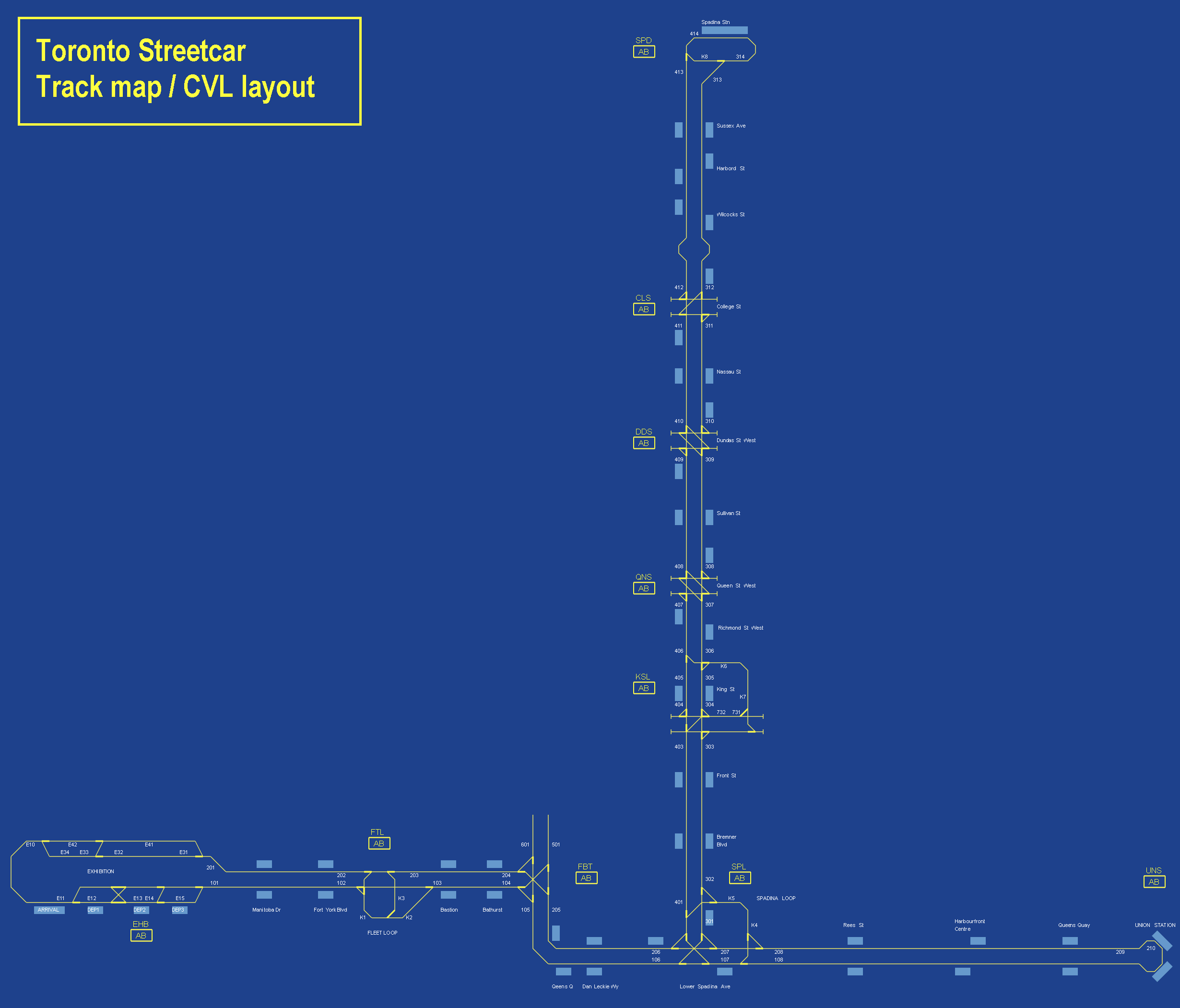
The image below shows the track layout as it appears in the CVL screen. | The image below shows the track layout as it appears in the CVL screen. | ||
[[File: | [[File:Toronto_CVL3.png|1200px|link=http://sim.bemined.nl/w/images/c/cc/Toronto_CVL3.png]] | ||
</div> | </div> | ||
| Line 173: | Line 236: | ||
<div id="mf-info" style="padding-top: 10px; padding-left: 1em; color: grey; text-align: left;"> | <div id="mf-info" style="padding-top: 10px; padding-left: 1em; color: grey; text-align: left;"> | ||
As driving on sight is not an option in Metrosimulator, a fixed block system has been installed on the line, with [[ATB]] train protection. The allowed speeds are being shown on the driver panel, and enforced by the system. If the next block is occupied, or switches have not been set, the maximum speed is 10 km/h. In this case, you may not pass the next "S"-sign next to the tracks, which indicate the block separations, until you get a higher indicated speed limit. The blocks have been kept short to allow short following distances.<br/> | As driving on sight is not an option in Metrosimulator, a fixed block system has been installed on the line, with [[ATB]] train protection. The allowed speeds are being shown on the driver panel, and enforced by the system. If the next block is occupied, or switches have not been set, the maximum speed is 10 km/h. In this case, you may not pass the next "S"-sign next to the tracks, which indicate the block separations, until you get a higher indicated speed limit (even if traffic lights are already green). The blocks have been kept short to allow short following distances.<br/> | ||
[[File:TTC022.jpg|500px]] | [[File:TTC022.jpg|500px]] | ||
| Line 182: | Line 245: | ||
[[File:TTC023.jpg|500px]] | [[File:TTC023.jpg|500px]] | ||
Even though the transit signal has a double layout, these are not double signals; both lights are for the same direction. | Even though the transit signal has a double layout, these are not double signals; both lights are for the same direction.<br/> | ||
Also, remain aware that you may only cross an intersection if both the traffic lights are green, AND you have a speed limit better then 10 from the train protection system. | |||
<br/> | <br/> | ||
| Line 200: | Line 264: | ||
Website of the TTC: https://www.ttc.ca/<br> | Website of the TTC: https://www.ttc.ca/<br> | ||
Wikipedia: https://en.wikipedia.org/wiki/509_Harbourfront<br> | Wikipedia: https://en.wikipedia.org/wiki/509_Harbourfront<br> | ||
Timelapse | Timelapse line 509: https://www.youtube.com/watch?v=wDivc2xdnvk | ||
Timelapse line 510: https://www.youtube.com/watch?v=myg7Kzg4n94 | |||
Revision as of 14:58, 29 June 2019
| Toronto Streetcar 509 Harbourfront & 510 Spadina |
|---|
509 Harbourfront and 510 Spadina are streetcar routes in Toronto, Canada, operated by the Toronto Transit Commission (TTC).
Line 509 has 12 stops, two of which underground.
Line 510 has 18 stops, three of which underground.
| The network |
|---|
|
General info Screenshot
Author:
Sjoerd Ydema
Lines:
2
Traction power supply:
overhead wire
Description:
Recreation of line 509 and 510 of the Toronto Streetcar system
MetroSim Version Required:
3.15
Download:
Not yet available - Route in production
|
|---|

|
Network information
Lines
Depots
Train-Protection Systems
Train usage
|
|---|


|
Line 509
Line 509 Harbourfront runs between Union Station and Exhibition, over a distance of approximately 4,1 kilometers. The line has 12 stops, of which two are underground (Unions Station and Queens Quay).
Unlike most other streetcar routes ("streetcar" = tram) in Toronto, the 509 Harbourfront runs over its full length on separated tracks (right-of-way); aside from road crossings, the streetcars do not run between other traffic.
|
||||||||||||||||||||||||||||||||||||||||||||||||||||||||||||||||||||||||||||||||||||||||||||||
|---|---|---|---|---|---|---|---|---|---|---|---|---|---|---|---|---|---|---|---|---|---|---|---|---|---|---|---|---|---|---|---|---|---|---|---|---|---|---|---|---|---|---|---|---|---|---|---|---|---|---|---|---|---|---|---|---|---|---|---|---|---|---|---|---|---|---|---|---|---|---|---|---|---|---|---|---|---|---|---|---|---|---|---|---|---|---|---|---|---|---|---|---|---|---|



|
Line 510
Line 510 Spaina runs between Spadina Station and Union Station, over a distance of approximately 6 kilometers. The line has 18 stops, of which three are underground (Spadina Station, Queens Quay and Union Station).
Unlike most other streetcar routes ("streetcar" = tram) in Toronto, the 510 Spadina runs over its full length on separated tracks (right-of-way); aside from road crossings, the streetcars do not run between other traffic. |
||||||||||||||||||||||||||||||||||||||||||||||||||||||||||||||||||||||||||||||||||||||||||||||||||||||||||||||||||||||
|---|---|---|---|---|---|---|---|---|---|---|---|---|---|---|---|---|---|---|---|---|---|---|---|---|---|---|---|---|---|---|---|---|---|---|---|---|---|---|---|---|---|---|---|---|---|---|---|---|---|---|---|---|---|---|---|---|---|---|---|---|---|---|---|---|---|---|---|---|---|---|---|---|---|---|---|---|---|---|---|---|---|---|---|---|---|---|---|---|---|---|---|---|---|---|---|---|---|---|---|---|---|---|---|---|---|---|---|---|---|---|---|---|---|---|---|---|---|---|

|
Rolling stock
Two types of rolling stock are being used on this line; the older CLRV Canadian Light Rail Vehicle and ALRV Articulated Light Rail Vehicle, and the more modern Bombardier Flexity Outlook tram.
|
|---|
|
Track layout
The image below shows the track layout as it appears in the CVL screen.
|
|---|
|
Signalling system
As driving on sight is not an option in Metrosimulator, a fixed block system has been installed on the line, with ATB train protection. The allowed speeds are being shown on the driver panel, and enforced by the system. If the next block is occupied, or switches have not been set, the maximum speed is 10 km/h. In this case, you may not pass the next "S"-sign next to the tracks, which indicate the block separations, until you get a higher indicated speed limit (even if traffic lights are already green). The blocks have been kept short to allow short following distances.
Even though the transit signal has a double layout, these are not double signals; both lights are for the same direction.
|
|---|


|
External links
Website of the TTC: https://www.ttc.ca/
|
|---|
Special thanks
The line is being created for use in Metrosimulator, in partnership with T2P Films Developments (https://developments.t2pfilms.ca/Downloads.html), who are providing a number of 3D objects for the simulation.
