Lausanne: Difference between revisions
mNo edit summary |
The header should have the name of the page + use of the side menu template |
||
| Line 1: | Line 1: | ||
{{Header|Lausanne | {{Header|Lausanne|#E3007B}} | ||
__NOTOC__ | __NOTOC__ | ||
This is a recreation of line M2 of the Lausanne metro. | This is a recreation of line M2 of the Lausanne metro. | ||
{{Header|The network|#E3007B}} | {{Header|The network|#E3007B}} | ||
<br> | |||
< | {{Infobox map | ||
|mapheader = Lausanne Line M2 | |||
|map = Lausanne_Routekaart.png | |||
|screenshot = Lausanne Map.jpg | |||
|author = Sjoerd Ydema | |||
|linenumber = 1 | |||
|traction = Side rails | |||
|description = Recreation of line M2 of the Lausanne metro | |||
|requirement = {{B|3|18}} | |||
|download = After release of Beta 3.18 | |||
}} | |||
<table style="float:left;width:50%;"> | <table style="float:left;width:50%;"> | ||
| Line 64: | Line 53: | ||
<tr> | <tr> | ||
<th colspan="4" width="100%" valign="top" style="border: 1px solid #E3007B; padding: 7px;"> | <th colspan="4" width="100%" valign="top" style="border: 1px solid #E3007B; padding: 7px;"> | ||
<div id="mf-infoheader" style="width: 400px;padding:5px;background:#E3007B;color:white;font-size:120%;"> | <div id="mf-infoheader" style="width: 400px;padding:5px;background:#E3007B;color:white;font-size:120%;">Line M2</div> | ||
<div id="mf-info" style="padding-top: 10px; padding-left: 1em; color: grey; text-align: left;"> | <div id="mf-info" style="padding-top: 10px; padding-left: 1em; color: grey; text-align: left;"> | ||
===History=== | ===History=== | ||
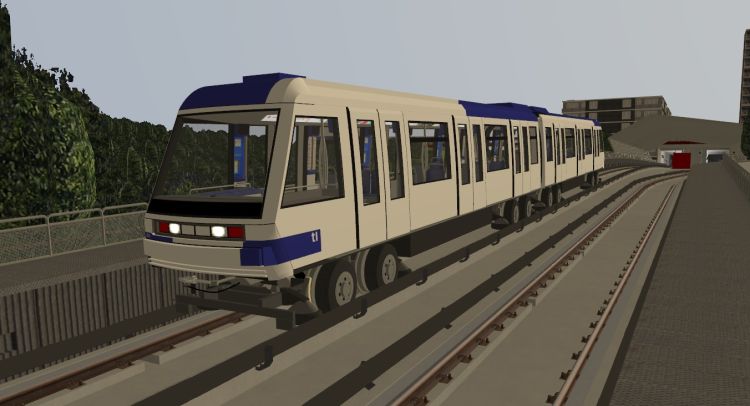
The line was opened in 1877 as the first funicular in Switzerland, between the train station and the lake. The line was known as La Ficelle (The String) and used water balance as the means of raising and lowering the cars. In 1958 the funicular was rebuilt into a rack and pinion railway using the Strub system and intermediate stations at Jordils and Montriond were opened. The line became known by the name métro, although to the natives and its many regular users it was always La Ficelle. | The line was opened in 1877 as the first funicular in Switzerland, between the train station and the lake. The line was known as La Ficelle (The String) and used water balance as the means of raising and lowering the cars. In 1958 the funicular was rebuilt into a rack and pinion railway using the Strub system and intermediate stations at Jordils and Montriond were opened. The line became known by the name métro, although to the natives and its many regular users it was always La Ficelle. | ||
On 22 January 2006 it was closed to be rebuilt as part of the new fully automated Line M2 of the Lausanne Metro, using the rubber tire technology of the Paris metro. | On 22 January 2006 it was closed to be rebuilt as part of the new fully automated Line M2 of the Lausanne Metro, using the rubber tire technology of the Paris metro. | ||
| Line 111: | Line 99: | ||
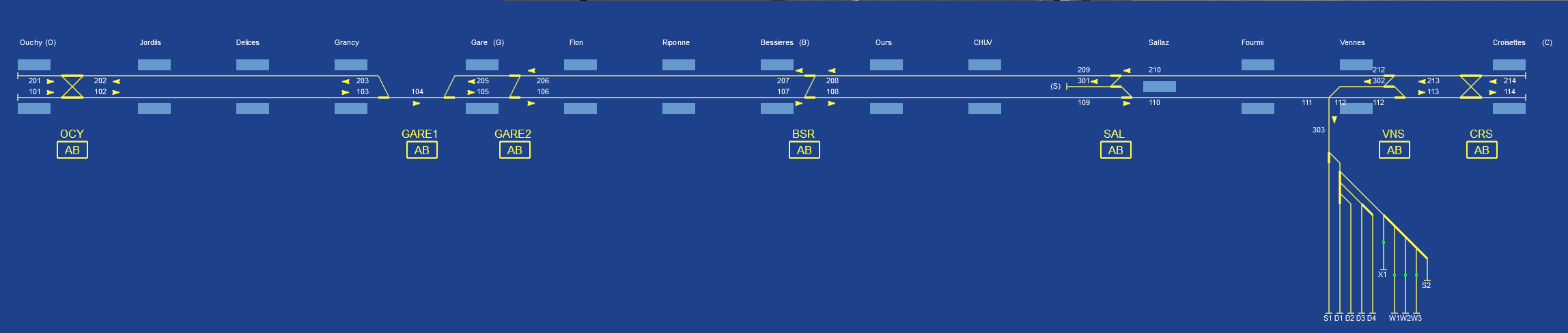
The image below shows the track layout as shown in the CVL screen. | The image below shows the track layout as shown in the CVL screen. | ||
<pic src="/w/images/6/6c/Lausanne_CVL.png" width=100% align=text /> | |||
</div> | </div> | ||
Revision as of 01:28, 4 February 2023
| Lausanne |
|---|
This is a recreation of line M2 of the Lausanne metro.
| The network |
|---|
|
General info Lausanne Line M2  Screenshot  Author: Sjoerd Ydema Lines: 1 Traction power supply: Side rails Description: Recreation of line M2 of the Lausanne metro MetroSim Version Required: Download: After release of Beta 3.18
|
|---|
|
Network information
Route
Depot
Train-Protection Systems
Train usage
|
|---|
|
Line M2
HistoryThe line was opened in 1877 as the first funicular in Switzerland, between the train station and the lake. The line was known as La Ficelle (The String) and used water balance as the means of raising and lowering the cars. In 1958 the funicular was rebuilt into a rack and pinion railway using the Strub system and intermediate stations at Jordils and Montriond were opened. The line became known by the name métro, although to the natives and its many regular users it was always La Ficelle. On 22 January 2006 it was closed to be rebuilt as part of the new fully automated Line M2 of the Lausanne Metro, using the rubber tire technology of the Paris metro. The trains, the "Be 8/8 TL", are a two-car variant of the MP89CA trains of the Paris metro. Platform edge doorsFor safety, all platforms have been equiped with platform edge doors. These doors will open simultaniously with the doors of the train, but in order to let passengers on and off the train, it is important to stop at the exact position along the platform to line the train doors up with the platform edge doors. In order to do this while driving the train in manual mode, all stations in the simulation have been fitted with London style stopmarkers. When you line up the edge of the front window with the middle of the stopmarker, the doors of the train will line up with the doors on the platform edge;
When the doors of the train and the platform edge do not line up, the platform edge doors will not open. Note: The platform edge doors will only open if you stop in the correct position. They will not open if you are already at this station in a newly spawned train (like at the start of the simulation); you need to have driven into the station, and stopped correctly, for the platform edge doors to work. Also, when changing direction (operating the train from the other end) the platform edge doors can only be closed, and not re-openend (unless you go back to the cabview which was on the front of the train when you entered the station).
Destination codesC - Croisettes S - Sallaz
|
|---|


|
Track layout
The image below shows the track layout as shown in the CVL screen.
|
|---|
|
Signalling system
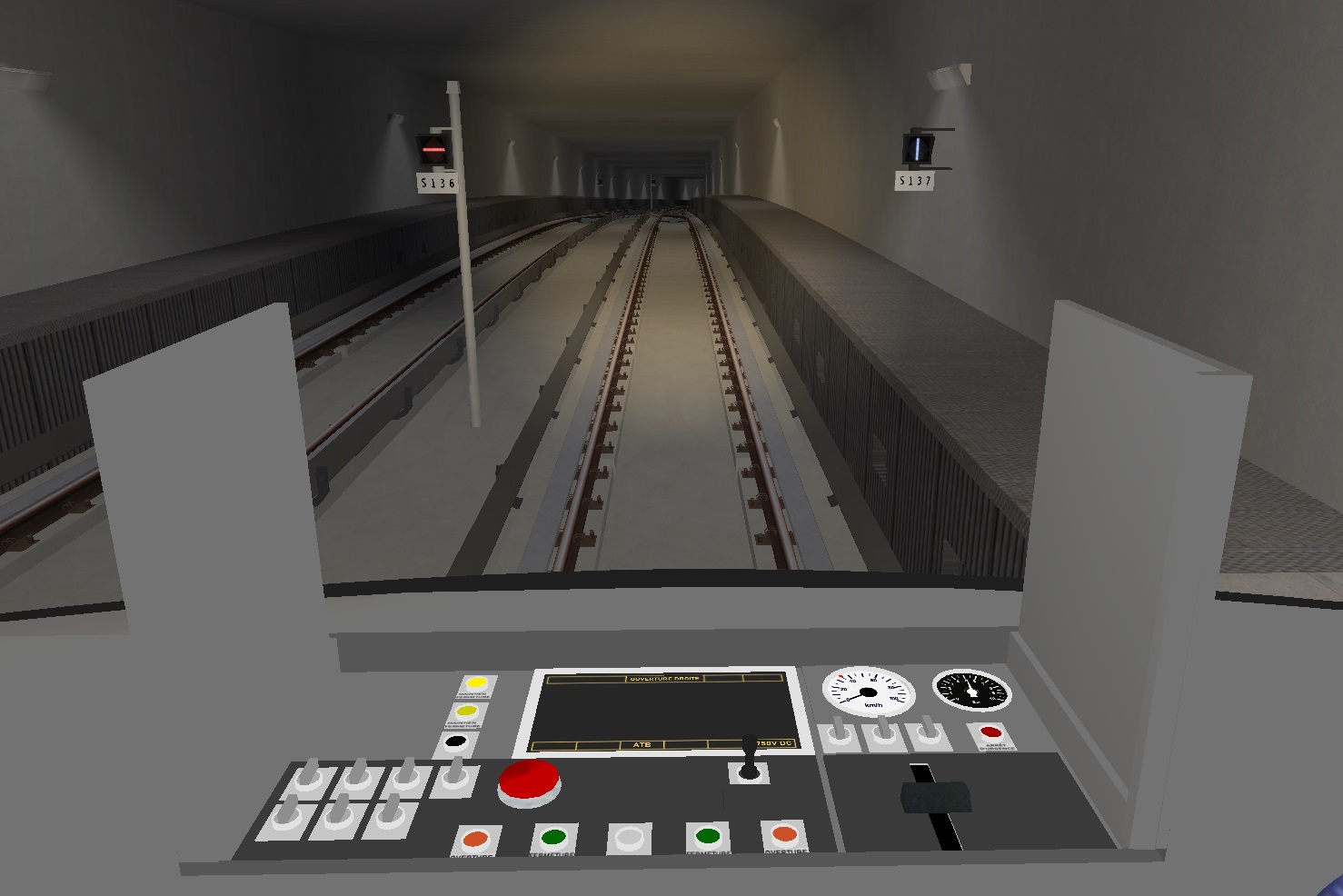
The line runs fully automatically and the trains do not have driver cabs. However, there are manual controls which can be used by staff to manually drive a train if needed. In the simulator, these controls can be accesed from the cab positions (key 1 and 2), by opening the control cover (Shift+X). When trains are driven in manual mode, the operator can get information on the maximum speed (send to the train by ATB tracksignals) by the red indicator in the speedometer. To see if a path has been set to pass junctions, at each junction along the line (and at the depot) light signals are provided. These light signals show a vertical blue line (or diagonal to indicate direction) when a path has been set and it is safe to continue, or a red horizontal line when you are not alowed to pass.
|
|---|
|
External links
|
|---|