Lausanne: Difference between revisions
Created page with "{{Header|Lausanne line M2|#E3007B}} __NOTOC__ This is a recreation of line M2 of the Lausanne metro. {{Header|The network|#E3007B}} <table style="float:right;"> <tr> <th colspan="4" width="330px" valign="top" style="border: 1px solid #E3007B; padding: 7px;"> <div id="mf-infoheader" style="padding:5px;background:#E3007B;color:white;font-size:120%;">General info</div> <br/><div id="mf-infoheader" style="padding:5px;background:silver;color:white;font-size:110%;">Lausan..." |
Release add-on Lausanne line M2 |
||
| (11 intermediate revisions by 2 users not shown) | |||
| Line 1: | Line 1: | ||
{{Header|Lausanne | {{Header|Lausanne|#d82f8a}} | ||
__NOTOC__ | __NOTOC__ | ||
This is a recreation of line M2 of the Lausanne metro. | This is a recreation of line M2 of the Lausanne metro. | ||
{{Header|The network|# | {{Header|The network|#d82f8a}} | ||
<br> | |||
{{Infobox map | |||
|mapheader = Lausanne Line M2 | |||
|map = Lausanne_Routekaart.png | |||
|screenshot = Lausanne Map.jpg | |||
|author = Sjoerd Ydema | |||
|linenumber = 1 | |||
|traction = Side rails | |||
|description = Recreation of line M2 of the Lausanne metro | |||
|requirement = {{B|3|18}} | |||
|download = [{{LausanneLink}} Download] | |||
}} | |||
{{Network Info|#d82f8a | |||
|lines = * [[Ouchy-Olympique]] – [[Croisettes]] | |||
|depots = * Vennes | |||
|protection = * [[ATB]] | |||
|trains = | |||
[[ | * [[Alstom_Metro|Be 8/8 TL]] | ||
[[File:Be88TL.jpg|300px]] | |||
}} | |||
*Vennes | |||
*[[ATB]] | |||
[[File:Be88TL.jpg| | |||
<br style="clear:both;"/> | <br style="clear:both;"/> | ||
{{Section-start|Line M2|#d82f8a}} | |||
{{Navigatie M2 Lausanne}} | |||
===History=== | ===History=== | ||
The line was opened in 1877 as the first funicular in Switzerland, between the train station and the lake. The line was known as La Ficelle (The String) and used water balance as the means of raising and lowering the cars. In 1958 the funicular was rebuilt into a rack and pinion railway using the Strub system and intermediate stations at Jordils and Montriond were opened. The line became known by the name métro, although to the natives and its many regular users it was always La Ficelle. | The line was opened in 1877 as the first funicular in Switzerland, between the train station and the lake. The line was known as La Ficelle (The String) and used water balance as the means of raising and lowering the cars. In 1958 the funicular was rebuilt into a rack and pinion railway using the Strub system and intermediate stations at Jordils and Montriond were opened. The line became known by the name métro, although to the natives and its many regular users it was always La Ficelle. | ||
On 22 January 2006 it was closed to be rebuilt as part of the new fully automated Line M2 of the Lausanne Metro, using the rubber tire technology of the Paris metro. | On 22 January 2006 it was closed to be rebuilt as part of the new fully automated Line M2 of the Lausanne Metro, using the rubber tire technology of the Paris metro. | ||
| Line 75: | Line 37: | ||
===Platform edge doors=== | ===Platform edge doors=== | ||
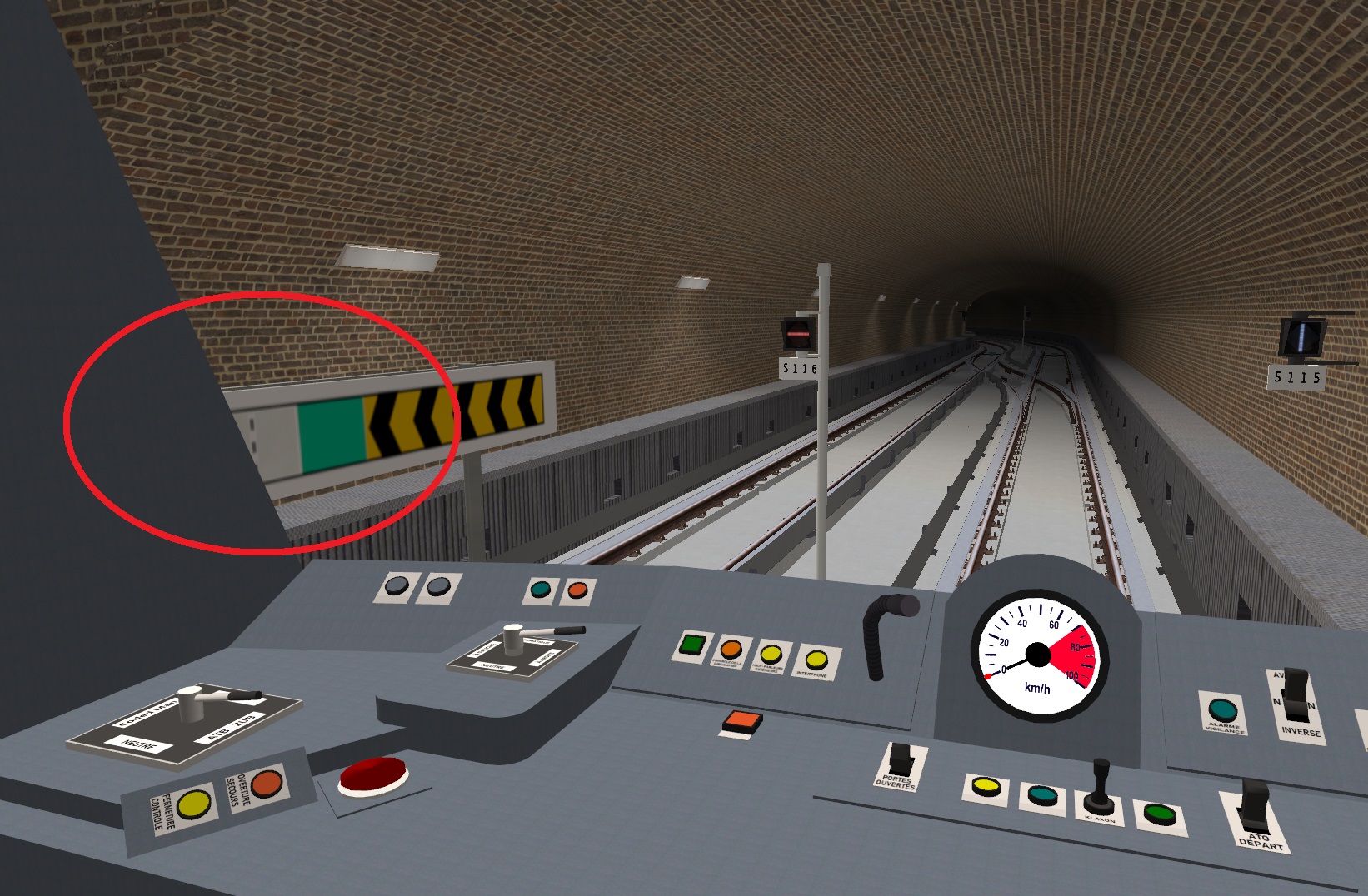
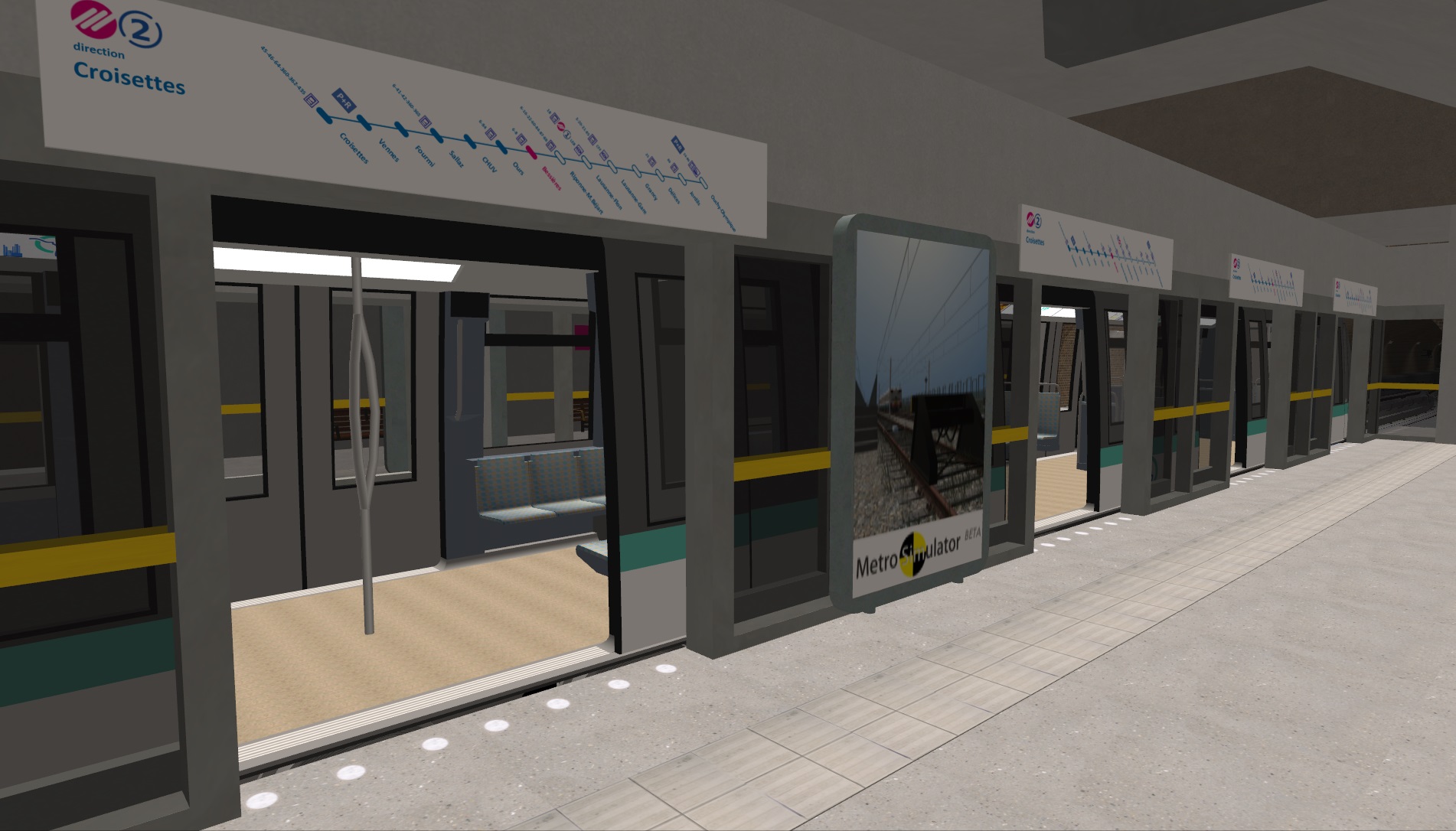
For safety, all platforms have been equiped with platform edge doors. These doors will open simultaniously with the doors of the train, but in order to let passengers on and off the train, it is important to stop at the exact position along the platform to line the train doors up with the platform edge doors. In order to do this while driving the train in manual mode, all stations in the simulation have been fitted with London style stopmarkers. When you line up the edge of the front window with the middle of the stopmarker, the doors of the train will line up with the doors on the platform edge; | For safety, all platforms have been equiped with platform edge doors. These doors will open simultaniously with the doors of the train, but in order to let passengers on and off the train, it is important to stop at the exact position along the platform to line the train doors up with the platform edge doors. In order to do this while driving the train in manual mode, all stations in the simulation have been fitted with London style stopmarkers. When you line up the edge of the front window with the middle of the stopmarker, the doors of the train will line up with the doors on the platform edge; | ||
| Line 86: | Line 47: | ||
Note: The platform edge doors will only open if you stop in the correct position. They will not open if you are already at this station in a newly spawned train (like at the start of the simulation); you need to have driven into the station, and stopped correctly, for the platform edge doors to work. Also, when changing direction (operating the train from the other end) the platform edge doors can only be closed, and not re-openend (unless you go back to the cabview which was on the front of the train when you entered the station). | Note: The platform edge doors will only open if you stop in the correct position. They will not open if you are already at this station in a newly spawned train (like at the start of the simulation); you need to have driven into the station, and stopped correctly, for the platform edge doors to work. Also, when changing direction (operating the train from the other end) the platform edge doors can only be closed, and not re-openend (unless you go back to the cabview which was on the front of the train when you entered the station). | ||
===Destination codes=== | |||
* C – Croisettes | |||
* O – Ouchy-Olympique | |||
* S – Sallaz | |||
* B – Bessières | |||
* G – Gare | |||
* D – Depot | |||
{{Section-end}} | |||
{{Section-start|Depot|#d82f8a}} | |||
=== | The line's depot is connected at Vennes. Using the middle track at this station (note; this track does not have a platform) trains can enter and exit the depot. | ||
The depot has 4 indoor stabling tracks, 1 outdoor stabling track, 3 workshop tracks, and 2 sidings (one of which is used to let the Unimog dualmode vehicle (rail/road) enter or leave the tracks. The function of the other siding, an indoor track long enough for 1 train, is unknown). | |||
Tracks to workshop and sidings: | |||
<pic src="/w/images/c/c9/Lausanne_Depot_1.jpg" width=70% align=text /> | |||
The doors of the workshop either open by setting a CVL path (the first door on the left), or by driving up to them (the 2nd and 3rd door). This is done as on the 2nd and 3rd tracks, it is possible to fit a train on the track just outside the door, and so setting a path to these tracks do not require you to drive inside. The first door on the left however does not have room to park a train outside, so setting a path to this track does require you to drive inside, and therefore the door is connected to the CVL system.</br> | |||
The same goes for the door to the indoor siding on extreme the right on the screenshot; this door is also connected to the CVL as there is not enough room to park a train in front of the door. | |||
The tracks inside the workshop are not electrified. You can coast your train inside, but to drive back out, you will either need to be towed out by another train, or couple up the Unimog (normally parked at the short siding directly outside) and have it tow you outside. The workshop can accomodate one train on each track. | |||
Workshop tracks: | |||
</ | <pic src="/w/images/1/1c/Lausanne_Depot_2.jpg" width=70% align=text /> | ||
The stabling tracks can accomodate up to 4 trains each, on 4 inside tracks and 1 outside track, creating a total capacity of 20 trains (there are 18 trains available). | |||
<pic src="/w/images/f/f1/Lausanne_Depot_3.jpg" width=70% align=text /> | |||
{{Section-end}} | |||
{{Section-start|Track Layout|#d82f8a}} | |||
The image below shows the track layout as shown in the CVL screen. | |||
< | <pic src="/w/images/6/6c/Lausanne_CVL.png" width=100% align=text /> | ||
{{Section-end}} | |||
{{Section-start|Signalling System|#d82f8a}} | |||
The line runs fully automatically and the trains do not have driver cabs. However, there are manual controls which can be used by staff to manually drive a train if needed. In the simulator, these controls can be accesed from the cab positions (key 1 and 2), by opening the control cover (Shift+X). | The line runs fully automatically and the trains do not have driver cabs. However, there are manual controls which can be used by staff to manually drive a train if needed. In the simulator, these controls can be accesed from the cab positions (key 1 and 2), by opening the control cover (Shift+X). | ||
When trains are driven in manual mode, the operator can get information on the maximum speed (send to the train by [[ATB]] tracksignals) by the red indicator in the speedometer. To see if a path has been set to pass junctions, at each junction along the line (and at the depot) light signals are provided. These light signals show a vertical blue line (or diagonal to indicate direction) when a path has been set and it is safe to continue, or a red horizontal line when you are not alowed to pass. | When trains are driven in manual mode, the operator can get information on the maximum speed (send to the train by [[ATB]] tracksignals) by the red indicator in the speedometer. To see if a path has been set to pass junctions, at each junction along the line (and at the depot) light signals are provided. These light signals show a vertical blue line (or diagonal to indicate direction) when a path has been set and it is safe to continue, or a red horizontal line when you are not alowed to pass. | ||
<pic src="/w/images/a/af/Lausanne_Signalling.jpg" width=70% align=text /> | |||
{{Section-end}} | |||
[ | {{Section-start|External Links|#d82f8a}} | ||
* [https://en.wikipedia.org/wiki/Lausanne_Métro Lausanne Métro – Wikipedia] | |||
* [https://en.wikipedia.org/wiki/Métro_Lausanne–Ouchy Métro Lausanne–Ouchy – Wikipedia] | |||
* [https://www.t-l.ch/ TL] | |||
{{Section-end}} | |||
{{Section-start|Extra|#d82f8a}} | |||
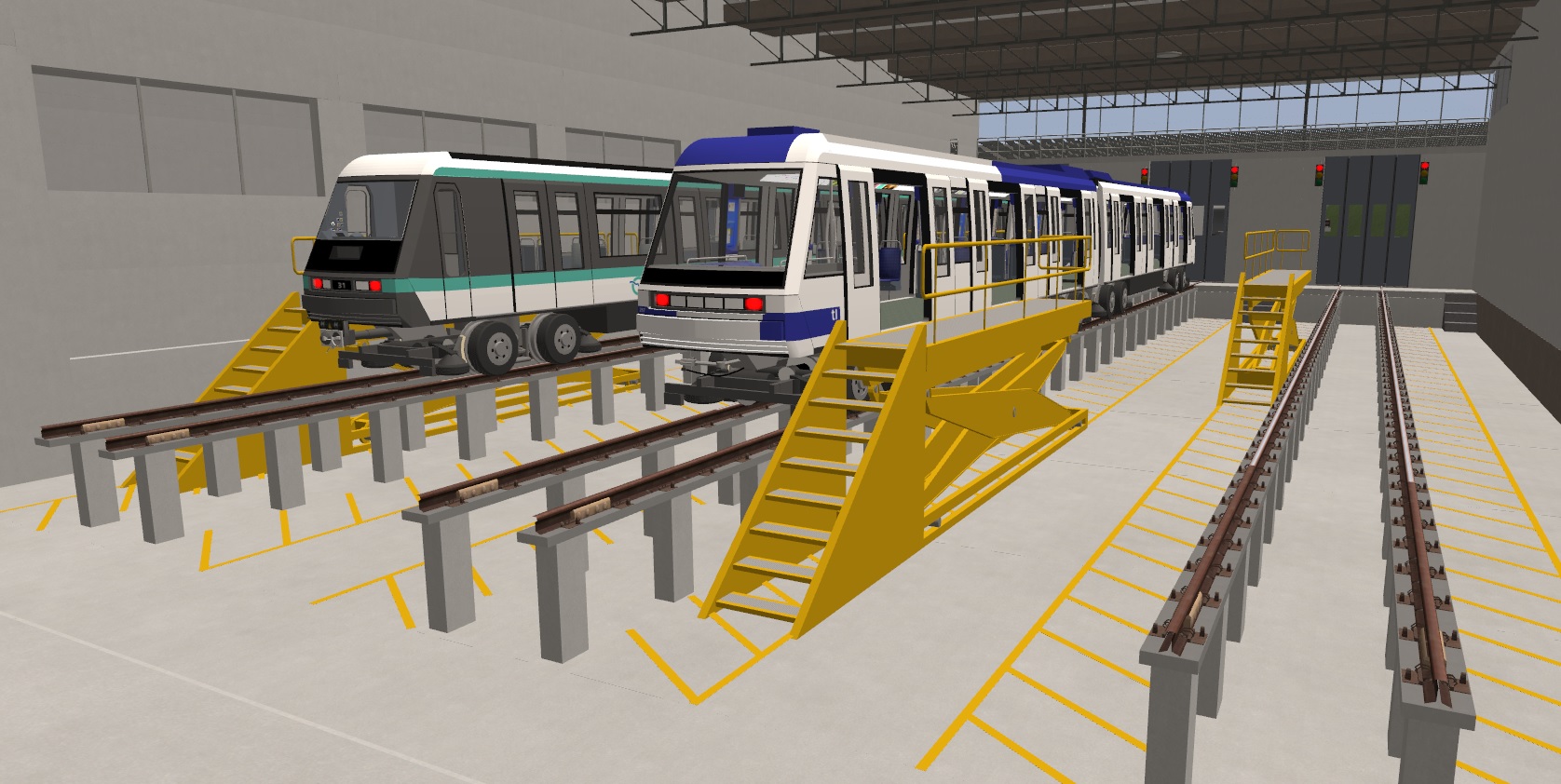
For those who would like to drive on this line using fully manually driven trains, instead of the Be 8/8 TL trains using its manual controls, the Lausanne add-on will also provide you with a (fictional) 2-car version of the Paris MP89CC train (as seen in the above workshop screenshot). The instruction for stopping at stations, making sure the traindoors line up with the platform edge doors, are the same as for the Be 8/8 TL trains; line up the edge of the front window with the middle of the stopmarker. | |||
< | <pic src="/w/images/8/82/Lausanne_043.jpg" width=70% align=text /> | ||
<pic src="/w/images/3/38/Lausanne_044.jpg" width=70% align=text /> | |||
{{Section-end}} | |||
{{ | {{Navigatie Routes}} | ||
Latest revision as of 18:20, 23 September 2023
| Lausanne |
|---|
This is a recreation of line M2 of the Lausanne metro.
| The network |
|---|
|
General info Lausanne Line M2  Screenshot  Author: Sjoerd Ydema Lines: 1 Traction power supply: Side rails Description: Recreation of line M2 of the Lausanne metro MetroSim Version Required: Download:
|
|---|
|
Network information
Lines
Depot(s)
Train-Protection Systems
Train usage
|
|---|

|
Line M2
HistoryThe line was opened in 1877 as the first funicular in Switzerland, between the train station and the lake. The line was known as La Ficelle (The String) and used water balance as the means of raising and lowering the cars. In 1958 the funicular was rebuilt into a rack and pinion railway using the Strub system and intermediate stations at Jordils and Montriond were opened. The line became known by the name métro, although to the natives and its many regular users it was always La Ficelle. On 22 January 2006 it was closed to be rebuilt as part of the new fully automated Line M2 of the Lausanne Metro, using the rubber tire technology of the Paris metro. The trains, the "Be 8/8 TL", are a two-car variant of the MP89CA trains of the Paris metro. Platform edge doorsFor safety, all platforms have been equiped with platform edge doors. These doors will open simultaniously with the doors of the train, but in order to let passengers on and off the train, it is important to stop at the exact position along the platform to line the train doors up with the platform edge doors. In order to do this while driving the train in manual mode, all stations in the simulation have been fitted with London style stopmarkers. When you line up the edge of the front window with the middle of the stopmarker, the doors of the train will line up with the doors on the platform edge;
When the doors of the train and the platform edge do not line up, the platform edge doors will not open. Note: The platform edge doors will only open if you stop in the correct position. They will not open if you are already at this station in a newly spawned train (like at the start of the simulation); you need to have driven into the station, and stopped correctly, for the platform edge doors to work. Also, when changing direction (operating the train from the other end) the platform edge doors can only be closed, and not re-openend (unless you go back to the cabview which was on the front of the train when you entered the station). Destination codes
|
||||||||
|---|---|---|---|---|---|---|---|---|



|
Depot
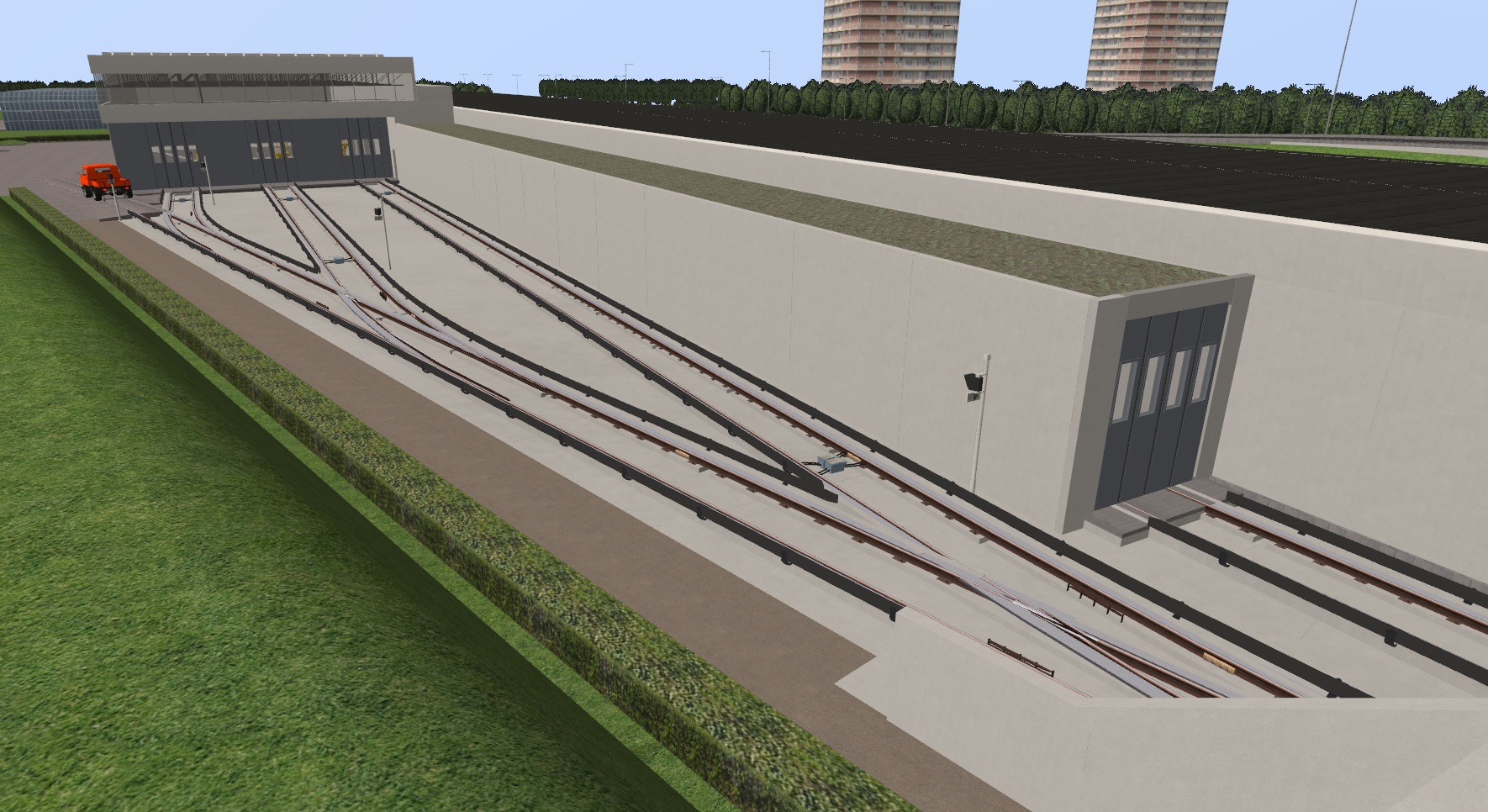
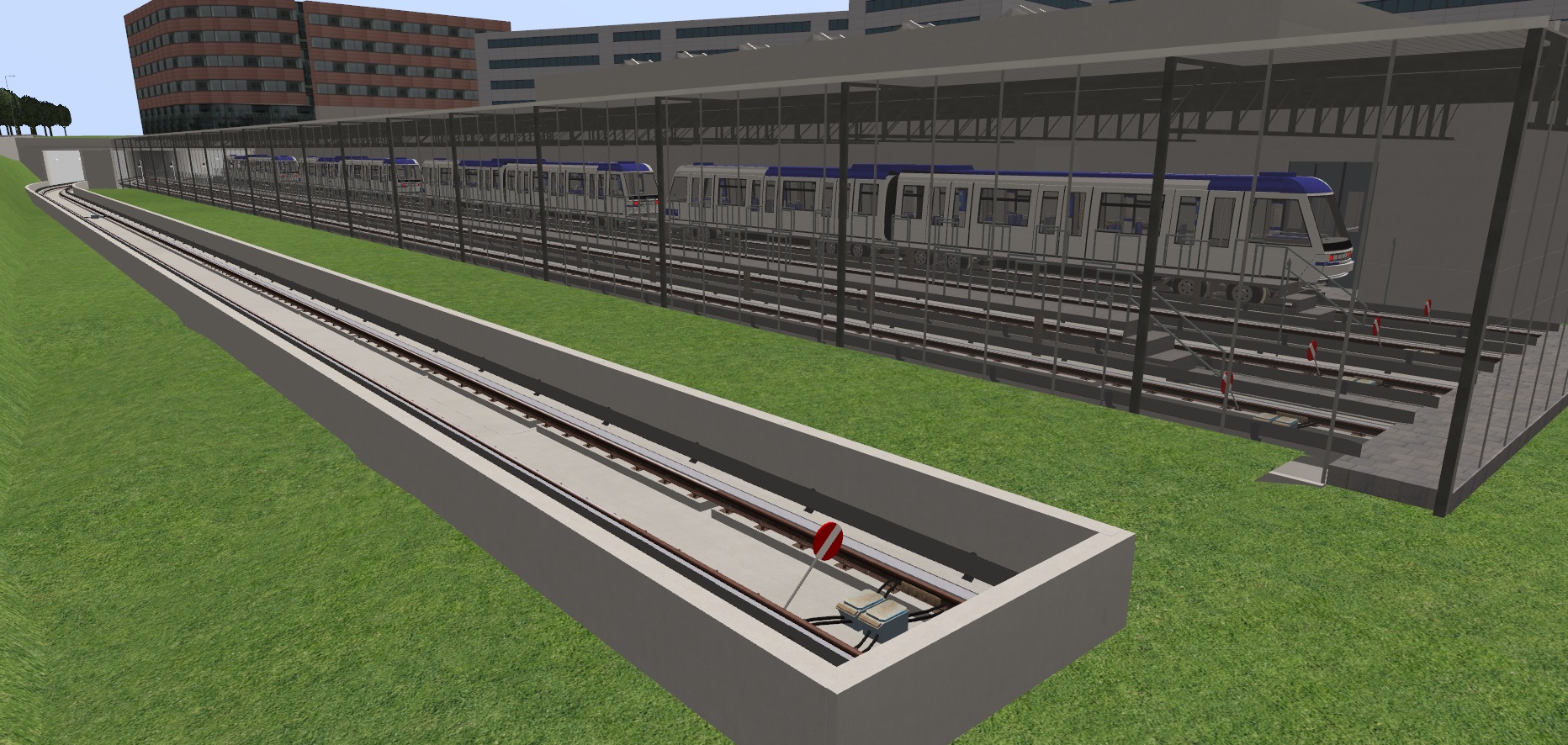
The line's depot is connected at Vennes. Using the middle track at this station (note; this track does not have a platform) trains can enter and exit the depot. The depot has 4 indoor stabling tracks, 1 outdoor stabling track, 3 workshop tracks, and 2 sidings (one of which is used to let the Unimog dualmode vehicle (rail/road) enter or leave the tracks. The function of the other siding, an indoor track long enough for 1 train, is unknown). Tracks to workshop and sidings:
The doors of the workshop either open by setting a CVL path (the first door on the left), or by driving up to them (the 2nd and 3rd door). This is done as on the 2nd and 3rd tracks, it is possible to fit a train on the track just outside the door, and so setting a path to these tracks do not require you to drive inside. The first door on the left however does not have room to park a train outside, so setting a path to this track does require you to drive inside, and therefore the door is connected to the CVL system.
Workshop tracks:
The stabling tracks can accomodate up to 4 trains each, on 4 inside tracks and 1 outside track, creating a total capacity of 20 trains (there are 18 trains available).
|
|---|
|
Track Layout
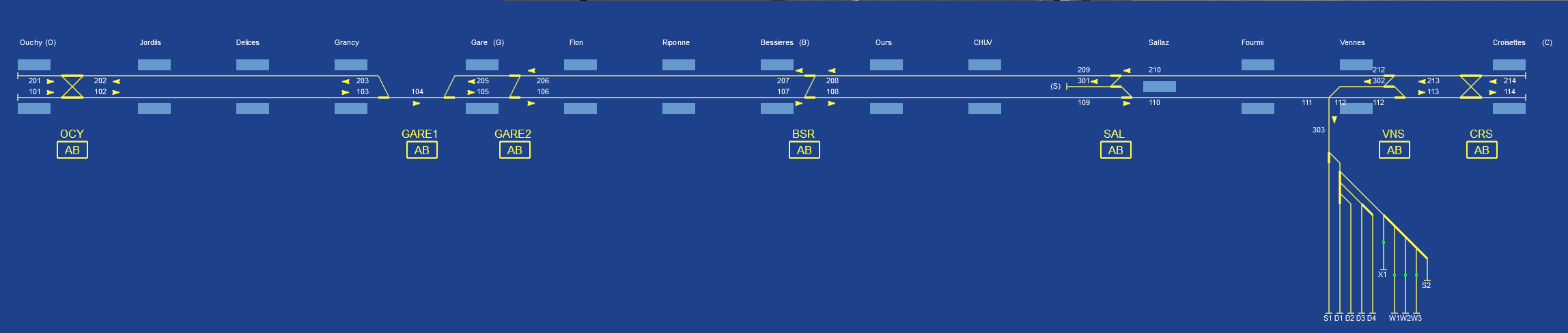
The image below shows the track layout as shown in the CVL screen.
|
|---|
|
Signalling System
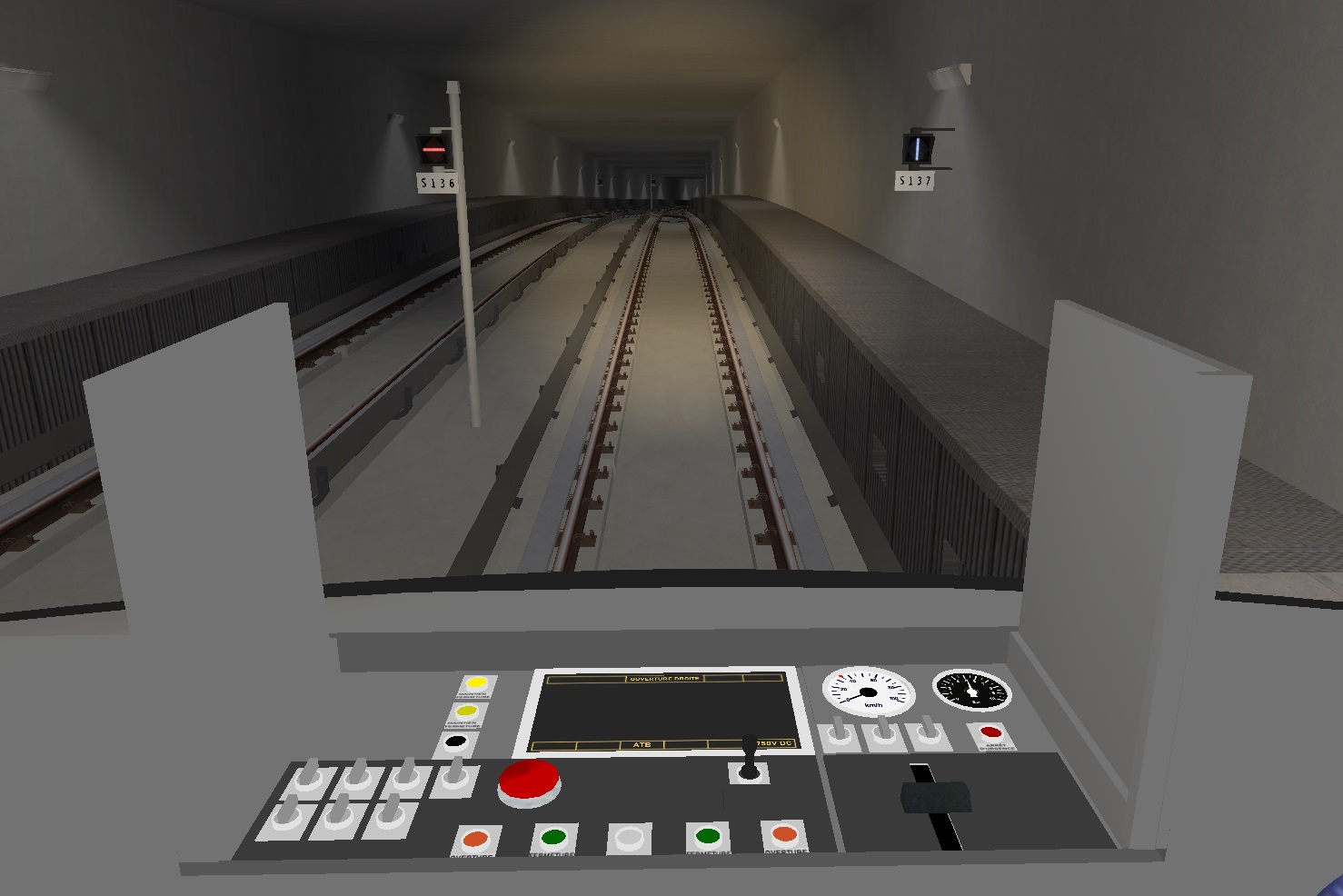
The line runs fully automatically and the trains do not have driver cabs. However, there are manual controls which can be used by staff to manually drive a train if needed. In the simulator, these controls can be accesed from the cab positions (key 1 and 2), by opening the control cover (Shift+X). When trains are driven in manual mode, the operator can get information on the maximum speed (send to the train by ATB tracksignals) by the red indicator in the speedometer. To see if a path has been set to pass junctions, at each junction along the line (and at the depot) light signals are provided. These light signals show a vertical blue line (or diagonal to indicate direction) when a path has been set and it is safe to continue, or a red horizontal line when you are not alowed to pass.
|
|---|
|
External Links
|
|---|
|
Extra
For those who would like to drive on this line using fully manually driven trains, instead of the Be 8/8 TL trains using its manual controls, the Lausanne add-on will also provide you with a (fictional) 2-car version of the Paris MP89CC train (as seen in the above workshop screenshot). The instruction for stopping at stations, making sure the traindoors line up with the platform edge doors, are the same as for the Be 8/8 TL trains; line up the edge of the front window with the middle of the stopmarker.
|
|---|